Menu
Your Cart

Hidden Digital Voice Recorder Watch | Password Protected, 35 Hour Battery

Hidden Digital Voice Recorder Watch | Password Protected, 35 Hour Battery
AUD $169.00
Ex Tax: AUD $153.64
  • Stock: In Stock
  • Model: VIM-VRS5
  • SKU: VIM-VRS5

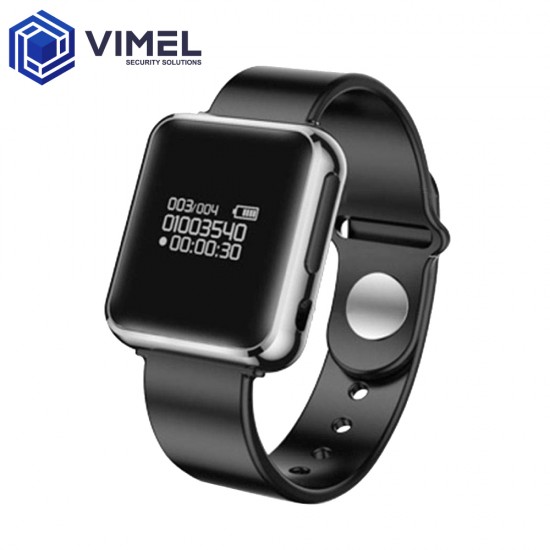
It tells time. Counts your steps. Plays music through earphones. Everything about this hidden digital voice recorder watch says 'digital watch' – because that's what it is. Built into the same 30-gram case is an 8GB audio recorder with a 35-hour battery, password-locked files, and four microphone presets that adjust to different environments.

Key Features

  • A Working Digital Watch – OLED screen shows time, date, and battery level. Built-in pedometer tracks steps. Plays MP3, WMA, FLAC, APE, and OGG music files. Splash and rain resistant on the wrist. It looks and works like a digital watch because it is one – the recorder is invisible.
  • 35-Hour Recording Battery – 180mAh lithium polymer. One full charge covers 35 hours of continuous recording or 15 hours of playback. With voice activation pausing during silence, a single charge stretches across days of intermittent use.
  • Password-Locked Files – Set a password on the device. Nobody plays, copies, or deletes your recordings without it – even if they plug the watch into a computer.
  • 4 Scene Presets – Normal, Meeting, Train, Long Range. Each adjusts microphone gain for the environment. Pick the one that matches where you are – the watch handles the sensitivity.
  • Voice Activated Recording – Starts when it hears sound. Stops when the room goes quiet. Recordings contain voices, not hours of empty silence. Saves battery and storage without you pressing anything.
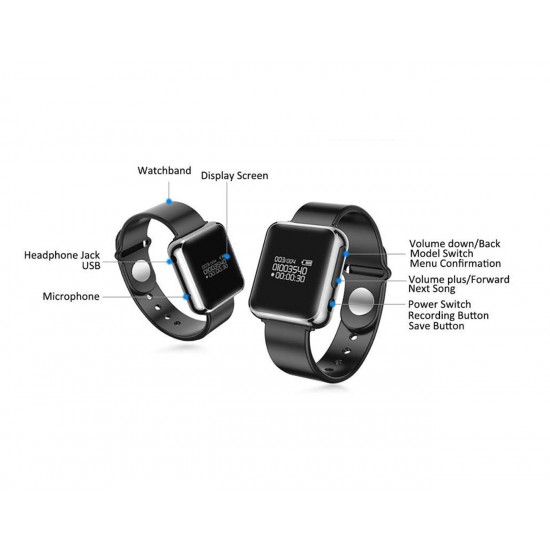
  • Review Audio on the Wrist – Plug the included earphone adapter into the Micro USB port. Navigate recordings on the OLED screen and listen back without a computer. Check what was captured before you leave the building.

Hidden digital voice recorder watch with water splashing around it

Who It's For

Consultations & Appointments

Medical, legal, financial – information comes fast and details matter later. Wear the watch into the appointment. Voice activation records the conversation while you focus on what's being said. Listen back through the earphone adapter on the way home or pull the file on your computer that evening.

Aged Care & Support Workers

When someone else is responsible for a family member's care, you want to know what happens during those hours. The watch sits on a bedside table or a wrist. Scheduled recording captures the window when a carer is present. Password protection means only you access the files.

Tenant & Rental Disputes

Inspections, maintenance visits, real estate agent walk-throughs. Verbal promises about repairs or bond that disappear after the conversation ends. The watch records the exchange on your wrist – timestamped and locked behind a password.

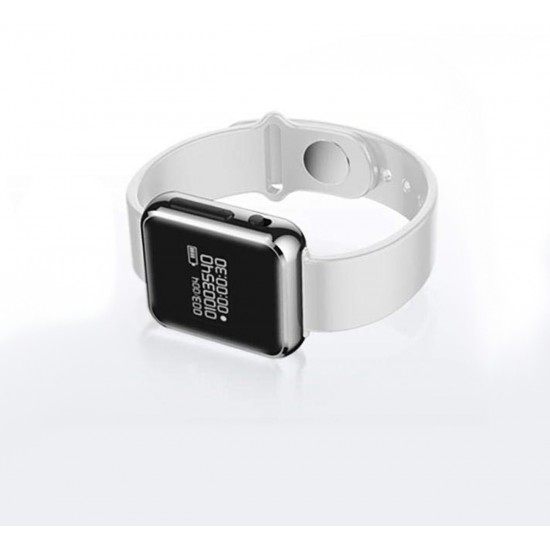
Hidden digital voice recorder watch laid flat showing full band and watch face

How It Works

  1. Set Up – Charge via Micro USB. Set the time, date, and password through the OLED menu. Choose a scene preset that matches your usual environment.
  2. Record – Press and hold the record button to start manually. Or set the timer for automatic start and stop at specific times – once, daily, or on weekdays. Voice activation is available in any mode.
  3. Review – Plug the earphone adapter into the watch and listen on the spot. Or connect to a Windows computer via USB, enter your password, and drag the files to your desktop.

Technical Specifications

  • Model: VIM-VRS5
  • Recording Formats: WAV (1536/512/256 kbps) + MP3 (128/64/32 kbps)
  • Sample Rate: 48KHz
  • Storage: 8GB built-in
  • Battery Life (Recording): ~35 hours
  • Battery Life (Playback): ~15 hours
  • Battery: 180mAh lithium polymer
  • Charging Time: ~3 hours (5V 500mAh)
  • Screen: OLED 96 × 64
  • Music Formats: MP3, WMA, FLAC, APE, OGG
  • Interface: Micro USB (charging + data)
  • Water Resistance: Splash and rain resistant (not submersible)
  • Dimensions: 40.8 × 33 × 10mm (watch head), 25cm total length with band
  • Weight: 30g
  • Material: ABS body + silicone band
  • Compatibility: Windows 2000 and above

Lawful Use

Recording a conversation you're part of is legal in some Australian states without the other person knowing. In other states, everyone in the conversation must consent. The law depends on your state and the situation. Look up the recording laws in your jurisdiction before you press record.

What's in the Box

  • 1× Digital Voice Recorder Watch
  • 1× Micro USB to Earphone Jack Adapter
  • 1× Micro USB to USB Charging Cable
  • 1× User Manual

FAQ

1. How long does the battery last for recording?

About 35 hours of continuous recording on a full charge. With voice activation – which pauses during silence – a single charge covers several days of intermittent use. Playback battery is about 15 hours.

2. Is the watch waterproof?

Splash and rain resistant – wear it in the rain, wash your hands with it on. It handles water contact during normal wear. Not designed for submersion. Don't swim or shower with it.

3. How much recording time fits on 8GB?

Depends on the format. WAV at 1536 kbps (highest quality) gives roughly 12 hours. MP3 at 32 kbps (lowest, still clear for speech) stretches past 500 hours. Multiple quality settings in between – pick the balance of clarity and storage that fits your situation.

4. When would I use the different scene modes?

Normal for everyday conversation at arm's length. Meeting for larger rooms where voices come from further away. Train for noisy environments – it adjusts sensitivity to cut through background sound. Long Range for picking up voices at a greater distance from the wrist.

5. Should I record in WAV or MP3?

For speech – meetings, conversations, appointments – MP3 at 128 kbps is clear enough and leaves plenty of room on the 8GB storage. Use WAV if audio quality matters more than storage space, like recording music or capturing detail in a noisy environment.


Learn More